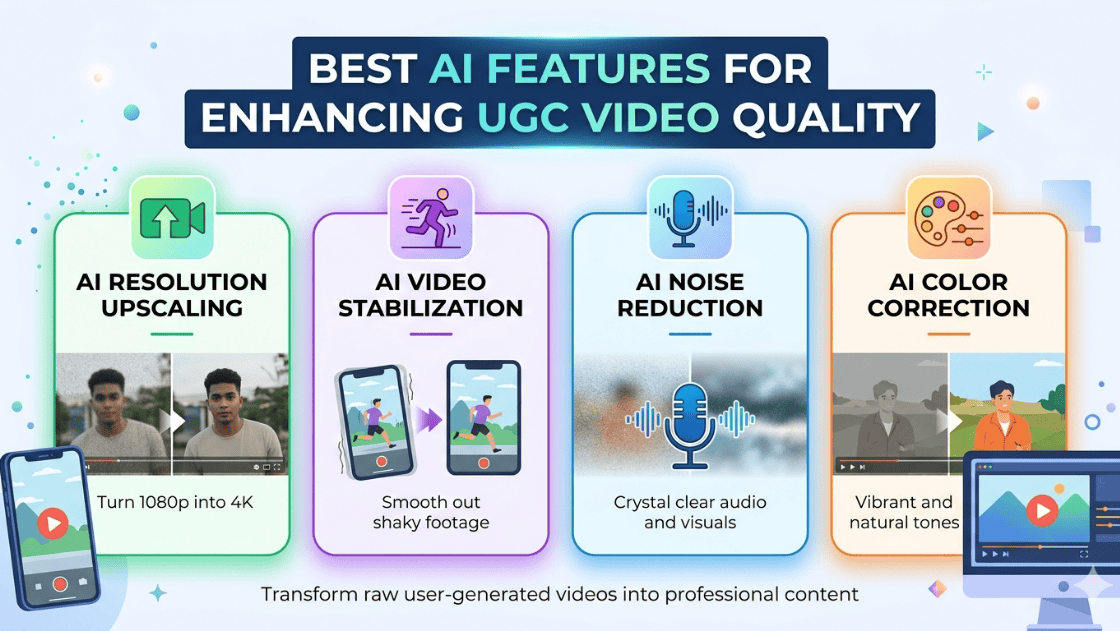

UGC videos are powerful because they feel authentic and relatable. However, raw user recordings can sometimes look unpolished. AI video enhancement tools bridge this gap by improving technical quality while maintaining the natural feel of user-generated content.
AI technology can analyze video frames, detect imperfections, and automatically correct issues such as noise, blur, lighting, and stability. These improvements help creators produce high-quality content without advanced editing skills.
For brands and marketers running campaigns at scale, AI tools also help maintain consistent video quality across multiple creators and platforms, making UGC suitable for ads, landing pages, and social media marketing.
Key Challenges in UGC Video Quality
Before exploring the AI features, it’s important to understand the common problems that affect UGC videos:
- Low-resolution footage from mobile devices
- Camera shake and unstable recording
- Poor lighting or color imbalance
- Background noise or unclear audio
- Inconsistent editing across creators
- Blurry or grainy footage in low-light conditions
AI tools solve these issues automatically using deep learning and computer vision technologies.
Top AI Features for Enhancing UGC Video Quality
Here are some top AI features for enhancing the quality of UGC video.
1. AI Video Super-Resolution and Upscaling
One of the most powerful AI features for improving UGC videos is AI super-resolution. This technology enhances low-resolution footage and converts it into higher-quality formats such as HD or 4K.
AI models analyze each frame and reconstruct missing details, resulting in sharper and clearer visuals. This is especially useful for videos recorded with older smartphones or compressed social media clips.
Key benefits include:
- Converts low-resolution videos into HD or 4K quality
- Reduces pixelation and visual artifacts
- Improves clarity and detail in product shots
- Makes videos suitable for advertising UGC campaigns
AI super-resolution uses deep learning models trained on thousands of video samples to predict missing details in each frame.
For marketers, this feature helps repurpose influencer or customer videos for professional marketing content.
2. AI Video Denoising and Artifact Removal
Many UGC videos contain unwanted visual noise, especially when recorded in low-light environments. If you look at common UGC video examples, you’ll often notice grain, compression artifacts, and visual distortions. AI-powered video denoising helps eliminate these issues and significantly improves video clarity.
Traditional editing tools require manual adjustments, but AI models automatically detect noisy pixels and replace them with cleaner visual information.
Advantages of AI denoising include:
- Cleaner and smoother visuals
- Improved video clarity in low-light footage
- Reduced compression artifacts
- More professional-looking videos
By eliminating visual distractions, AI denoising improves viewer experience and engagement.
3. AI Video Stabilization
Handheld recording is common in UGC videos, which often results in shaky footage. AI-powered stabilization analyzes camera motion and compensates for unwanted movement.
Instead of basic cropping methods used in traditional stabilization, AI uses motion tracking algorithms to create smooth and stable footage.
Benefits of AI stabilization include:
- Removes shaky camera movement
- Improves watchability and viewer retention
- Creates smoother product demonstrations
- Makes handheld footage look professional
Stabilized videos are particularly important for social media ads, tutorials, and product demonstrations, where clear visuals are essential.
4. AI Color Correction and HDR Enhancement
Color plays a major role in video quality and audience perception. AI-powered color correction automatically adjusts brightness, contrast, exposure, and saturation.
Some tools also provide HDR enhancement, which improves dynamic range and balances highlights and shadows.
Advantages of AI color enhancement:
- Automatically balances lighting conditions
- Improves skin tones in influencer videos
- Creates vibrant and eye-catching visuals
- Maintains consistent colors across clips
For brands working with multiple creators, AI color grading helps maintain a consistent visual style across campaigns.
5. AI Auto Editing and Scene Detection
Editing raw UGC footage can be time-consuming, especially when dealing with long recordings. AI auto-editing tools streamline this process by detecting important moments and creating structured video clips.
These tools use machine learning to analyze content, identify highlights, and automatically trim unnecessary segments.
Key capabilities include:
- Automatic scene detection
- Highlight extraction
- Smart trimming and transitions
- Story-based editing suggestions
This feature allows creators and marketers to transform long recordings into short-form content for TikTok, Instagram Reels, and YouTube Shorts.
6. AI Motion Deblur and Frame Interpolation
Fast movement often causes blur or choppy motion in videos. AI motion enhancement technologies address this problem using two main techniques:
Motion Deblur: AI analyzes motion patterns across frames to reduce blur caused by movement.
Frame Interpolation: AI generates additional frames between existing frames to create smoother motion.
Benefits include:
- Smoother video playback
- Reduced motion blur
- Better clarity in action shots
- Improved visual flow in transitions
This feature is particularly useful for product demos, sports content, and action-focused UGC videos.
7. AI Facial Enhancement and Portrait Optimization
Many UGC videos feature people speaking directly to the camera, such as testimonials, reviews, or influencer content.
AI facial enhancement tools improve facial details while maintaining a natural appearance.
These tools can:
- Enhance skin texture
- Improve eye clarity
- Sharpen facial features
- Maintain realistic expressions
The result is more engaging and visually appealing content without losing authenticity.
8. AI Object Removal and Background Enhancement
UGC videos often include distracting elements such as background clutter, unwanted objects, or random passersby.
AI object removal automatically detects these distractions and reconstructs the background to maintain visual consistency.
Common uses include:
- Removing unwanted objects or logos
- Cleaning messy backgrounds
- Blurring or replacing backgrounds
- Enhancing focus on the main subject
This feature helps creators produce cleaner videos while keeping the original footage intact.
9. AI Auto Subtitles and Caption Generation
Many viewers watch social media videos without sound, making captions essential for engagement.
AI captioning tools automatically generate accurate subtitles and synchronize them with speech.
Benefits include:
- Improved accessibility
- Increased engagement on silent autoplay platforms
- Multi-language subtitle support
- Better video discoverability
Auto captions save time and allow creators to reach global audiences more effectively.
10. AI Audio Enhancement and Voice Cleanup
Audio quality is just as important as video quality. AI audio enhancement tools remove background noise and improve voice clarity.
Key features include:
- Noise reduction
- Echo removal
- Voice enhancement
- Automatic volume leveling
These improvements help UGC videos sound more professional, especially when recorded in uncontrolled environments.
Benefits of Using AI to Enhance UGC Videos
Integrating AI features into video production offers several advantages:
1. Faster Content Production: AI automates editing and enhancement processes, reducing manual work.
2. Cost Efficiency: Creators can achieve professional-quality videos without expensive equipment or editing teams.
3. Higher Engagement: Clear visuals, better sound, and smoother motion improve viewer retention.
4. Scalable Content Creation: Brands can process large volumes of UGC content quickly for marketing campaigns.
Future of AI in UGC Video Creation
AI video technology is evolving rapidly. New innovations are making it easier to generate and enhance videos with minimal human effort.
Some emerging trends include:
- AI-generated avatars and talking-head videos
- Real-time video enhancement
- AI-driven storytelling and editing
- Personalized video content for marketing
As these technologies continue to improve, AI will play an even larger role in automating and scaling UGC content production.
Conclusion
User-generated content has become a cornerstone of modern digital marketing, but inconsistent video quality can limit its effectiveness. AI-powered video enhancement features solve this challenge by improving visuals, audio, and editing automatically.
From AI super-resolution and stabilization to smart editing and caption generation, these technologies help creators produce professional-looking videos without complex editing skills.
For brands, marketers, and creators, adopting AI tools for UGC video enhancement offers a powerful way to increase engagement, maintain content quality, and scale video production efficiently.
As AI continues to evolve, we can expect even more advanced features that make UGC videos faster to produce, higher in quality, and more impactful for audiences worldwide.